QR-Code
You’ve likely scanned a QR code today to pay for coffee, check into a flight, or view a digital menu, but behind those mundane black-and-white squares lies a true masterpiece of modern engineering. Invented in 1994 by a Japanese automotive company to solve a factory logistics bottleneck, the QR (Quick Response) code has quietly evolved into one of the most vital technologies in the world. Inspired by the ancient board game Go, protected by deep-space error-correction algorithms, and intentionally left free for global use, this unassuming grid is so remarkably durable that it can be stamped with corporate logos or even carved into tombstones and still scan perfectly. Whether you’re a tech enthusiast or just a daily scanner, you’re about to see this everyday tool in a completely new light; from its surprising origins to the bizarre ways it’s used today, here are 25 of the most interesting and surprising facts about the QR code.
🧠 History & Origins
1. The “QR” Stands for “Quick Response”
The name wasn’t chosen at random. In the fast-paced environment of automotive manufacturing, traditional barcodes were too slow and required precise alignment. The creators specifically designed this new code to be read instantly from any angle, drastically reducing the “response” time for scanners on the assembly line.
2. Invented in 1994 by Masahiro Hara at Denso Wave
Masahiro Hara and his research team at Denso Wave (a subsidiary of Toyota) were tasked with solving a massive logistics bottleneck. Little did they know that their solution to a 1990s factory problem would become a ubiquitous piece of global infrastructure three decades later.
3. Originally Designed to Track Car Parts
Before the QR code, workers had to scan multiple individual 1D barcodes on a single box of auto parts to get all the necessary data. The QR code consolidated all that information into one scannable square, saving countless hours and eliminating human error in inventory tracking.
4. Inspired by the Ancient Board Game Go
The team struggled with how to make the code easily detectable by early, low-resolution cameras. Hara found his breakthrough by observing the black and white stones (counters) used in Go, a traditional Japanese strategy game. He realized the stark, high-contrast alternating pattern would make the code’s position markers instantly recognizable to a digital sensor.
⚙️ Design & Technology
5. They Are 2D, Not 1D
Traditional barcodes are one-dimensional; they are read horizontally by a narrow laser beam, limiting them to about 20 characters. QR codes are two-dimensional matrix barcodes. Because they are read both horizontally and vertically by digital image sensors (like your phone’s camera), their data capacity is exponentially larger.
6. The “Finder Patterns” Are the Secret to Their Speed
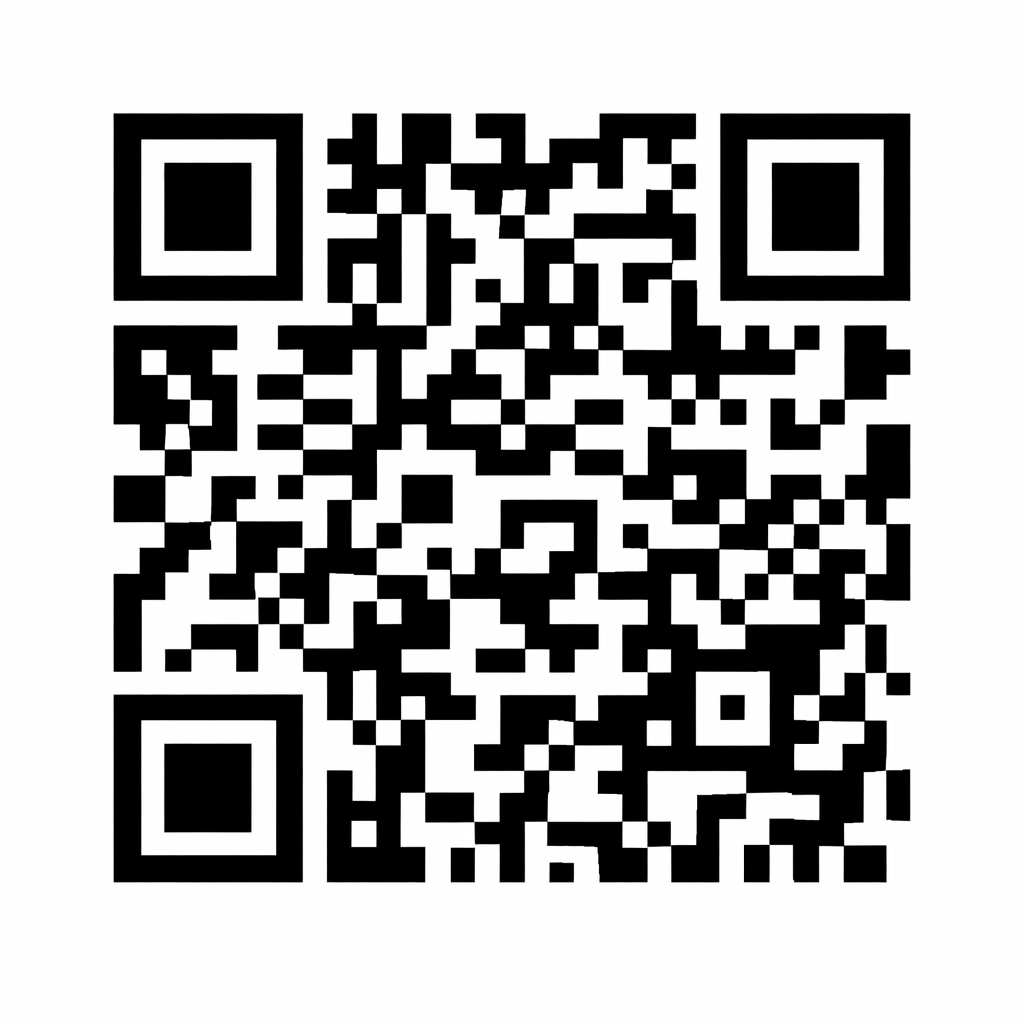
Those three distinctive, bullseye-like squares in the upper-left, upper-right, and lower-left corners aren’t just for aesthetics. They are “finder patterns.” A scanner’s software specifically looks for the unique 1:1:3:1:1 ratio of black and white modules in these squares. This allows the camera to instantly determine the code’s location, orientation, and size, even if it’s upside down or tilted.
7. Massive Data Capacity
A single, maximum-sized QR code (Version 40) is a data powerhouse. It can store up to 7,089 numeric digits, 4,296 alphanumeric characters, 2,953 binary bytes, or 1,817 Kanji characters. That’s enough space to store a short paragraph of text or a highly complex URL with tracking parameters.
8. Native Kanji Character Support
Because it was invented in Japan, the QR code specification includes a dedicated “Kanji mode.” This mode compresses Japanese characters much more efficiently than standard UTF-8 encoding, making the code incredibly space-efficient for Japanese text compared to Western alphabets.
9. 40 Different Sizes (Versions)
QR codes are not one-size-fits-all. They scale dynamically based on the data they hold. They range from Version 1 (a compact 21×21 grid of dots) all the way up to Version 40 (a massive 177×177 grid). The more data you pack in, the larger and denser the grid becomes.
🛡️ Durability & Error Correction
10. Practically Indestructible (Thanks to Reed-Solomon)
QR codes utilize a mathematical algorithm called Reed-Solomon error correction—the same technology used to prevent scratches from ruining audio CDs and to ensure clear communication with deep-space satellites. This means a QR code can still be scanned perfectly even if it is scratched, dirty, wet, or partially torn.
11. Four Levels of “Survivability”
Creators can customize a QR code’s durability based on its intended use. There are four error correction levels: Level L (recovers 7% of data), Level M (15%), Level Q (Quartile, 25%), and Level H (High, 30%). The catch? The higher the error correction, the fewer dots are available for actual data storage.
12. They Can Be Turned Into Art
Because of Level H error correction, designers can intentionally “damage” the code for aesthetic purposes. You can embed a company logo in the center, change the dots to brand colors, or add artistic flourishes. The scanner simply interprets the logo as “damage” and uses the error correction algorithm to read the data around it.
💼 Business & Global Adoption
13. The Technology Is Free to Use
In a visionary move that fueled its global explosion, Denso Wave chose to exercise its patent rights but not enforce them for standardized QR codes. This open-access approach meant any developer or company in the world could generate and use QR codes without paying a single cent in licensing fees.
14. The Name “QR Code” Is Trademarked
While the underlying technology is free for all to use, the actual term “QR Code” is a registered trademark of Denso Wave. The company actively protects this trademark to ensure the technology maintains its quality standards and isn’t associated with inferior, non-standardized knock-offs.
15. They Power “Virtual Stores”
Pioneered by the retailer Home Plus (Tesco) in South Korea, commuters could scan QR codes on a wall of life-sized product images in subway stations. The items were then delivered directly to their homes. This brilliant innovation turned a daily commute into a shopping trip without the need for physical inventory or a brick-and-mortar store.
16. Printed on Official Currency
QR codes have been embedded in legal tender to bridge the physical and digital worlds. Notable examples include a 2011 Dutch commemorative coin, a 2014 Nigerian 100-naira banknote, a 2015 Russian 100-ruble note, and a 2017 Ghanaian 5-cedi note. Scanning them with a phone reveals the historical story behind the currency.
17. Fighting Counterfeit Goods
Luxury brands, automotive parts manufacturers, and pharmaceutical companies now use unique, serialized QR codes on their packaging. Consumers and retailers can scan them to verify the product’s exact journey through the supply chain, ensuring it is not a dangerous or illicit fake.
📱 Everyday & Unusual Uses
18. Instant Wi-Fi Access
Instead of spelling out a complex, 20-character Wi-Fi password to guests, hosts can generate a QR code containing the network name (SSID), encryption type, and password. A quick scan prompts the phone to connect instantly, eliminating typos and frustration.
19. Digital Business Cards (vCards)
QR codes can encode a “vCard” (virtual contact card). Scanning it prompts the user’s phone to instantly save the person’s name, phone number, email, website, and company directly into their contacts app, eliminating the need for manual data entry or flimsy paper cards.
20. Secure Website Logins
Services like WhatsApp Web, Discord, and Google use QR codes for secure, password-less authentication. A unique code appears on the computer screen, and scanning it with your already-logged-in smartphone acts as a cryptographic key, logging you in securely without ever typing a password on a public desktop.
21. Mobile Event Tickets
In Japan, QR codes displayed on smartphones are the standard admission ticket for major events, including J1 League soccer and Nippon Professional Baseball games. Because these codes can be dynamic (changing every few seconds), they prevent screenshot fraud and ticket scalping.
22. Carved Into Tombstones
Since 2008, companies like Ishinokoe in Japan have been engraving QR codes on headstones. Scanning the stone takes visitors to a “virtual grave” containing photos, obituaries, and memories of the deceased. This poignant trend has since spread to cemeteries in Uruguay, the United States, and Europe.
🌍 Modern Cultural Impact
23. The Pandemic Restaurant Staple
COVID-19 permanently changed the dining experience. Restaurants globally replaced physical, hard-to-clean paper or plastic menus with QR code decals on tables. This “touchless” innovation improved sanitation, reduced printing costs, and allowed for real-time menu updates. It is now a permanent fixture in the hospitality industry.
24. Global Contact Tracing
During the pandemic, countries like Australia (COVIDSafe), Singapore (SafeEntry), and the UK mandated QR code scanning at retail and hospitality venues. This created a digital, time-stamped log of who was where, drastically speeding up public health contact tracing efforts and helping to contain outbreaks.
25. They Spawned a New Cyber Threat: “Quishing”
With great convenience comes great risk. Scammers now engage in “quishing” (QR code phishing). They secretly paste fake QR code stickers over legitimate ones on public parking meters, utility poles, or restaurant tables. When scanned, these redirect victims to fraudulent websites designed to steal credit card information or login credentials.
❓ Frequently Asked Questions (FAQs) About QR Codes
“QR” stands for Quick Response. The name was chosen by its inventors at Denso Wave in 1994 because the code was specifically designed to be read and decoded by scanners at high speed, drastically reducing the time it took to process information compared to traditional barcodes.
In most cases, no. Nearly all modern smartphones (iPhones running iOS 11 or later, and most Android phones) have a built-in QR code scanner directly in their default camera app. Simply open your camera, point it at the code, and tap the notification link that pops up. If your phone is older, you can download a free, reputable QR scanner from your device’s official app store.
The QR code itself cannot give your phone a virus; it is simply a visual representation of text or a URL. However, the destination it links to can be malicious. Scammers use a tactic called “quishing” (QR phishing) by pasting fake codes over legitimate ones (like on parking meters or restaurant tables) to redirect you to fraudulent websites. Safety tip: Always check the URL preview on your screen before tapping “Open,” and never enter personal or financial information on a site you don’t recognize.
It depends on how they were created. A static QR code (where the data, like a simple URL or Wi-Fi password, is permanently encoded into the pattern) will never expire and will work forever, as long as the image remains scannable. A dynamic QR code (often used by businesses for marketing) redirects to a URL that the creator can change or deactivate. If the creator turns it off or the subscription to the QR service ends, the code will stop working.
A traditional barcode is one-dimensional (1D) and can only be read horizontally by a laser scanner, holding a maximum of about 20-25 characters (usually just numbers). A QR code is two-dimensional (2D), meaning it can be read both horizontally and vertically by a digital camera. This allows it to hold exponentially more data (thousands of characters, URLs, or even contact information) in a fraction of the space.
This is possible thanks to a feature called error correction. QR codes are built with redundant data, meaning up to 30% of the code can be damaged, obscured, or covered, and it will still scan perfectly. Designers intentionally place logos or brand colors in the center, and the scanner’s algorithm simply treats the logo as “damage” and reads the data around it.
Yes! If you see a QR code on your computer screen or in a photo gallery, you don’t need a second device to scan it. On iPhones, you can open the photo in your Photos app and use the “Live Text” feature to tap the QR code. On Android and many desktop browsers (like Chrome), you can often right-click the image and select “Search image with Google Lens” to decode it instantly.
There are many reputable, free online QR code generators (such as QR Code Monkey or the built-in generator in Google Chrome). To make one, simply choose the type of data you want to encode (e.g., URL, Text, Wi-Fi, vCard), paste your information into the generator, customize the design if desired, and download the image as a high-resolution PNG or SVG file.
Not necessarily, but high contrast is required. The scanner needs to easily distinguish the dark modules (data) from the light background. A dark blue code on a white background works perfectly. However, a light-colored code on a light background, or a code with a busy, patterned background, will likely fail to scan.